Brim September 2026 Release: Improvement Suggestions, Variable Index Preview, and More

October 5, 2026

This month is about balancing accuracy and token usage. The Variable Optimizer now shows you Improvement Suggestions first, so you decide what gets implemented. New Token Usage Management tools help you plan your project's token budget and see how to reduce usage while keeping the accuracy your project needs. We're also shipping several customer-requested improvements, sharing an important update on Azure OpenAI model retirements, and launching Brim Field Notes, our new live conversation series.
The Optimizer: A Collaborator, Not an Autopilot
Last month's Optimizer made variable revisions testable. This month it puts you in charge of what gets revised. Instead of rewriting instructions in one pass, the Optimizer now lays out what it would change and why, and you choose what to keep.
Open Project Setup and click Optimize on a variable. From there you can:
- Review Improvement Suggestions first. Before anything is rewritten, the Optimizer lists each proposed change with its reasoning. Pick the suggestions you want to implement and skip the rest.
- Get suggestions grounded in your data. The Optimizer draws more effectively on your validation examples, so its suggestions target the disagreements that matter most.
- See exactly what changed. Differences between current and proposed instructions are highlighted, so you're never guessing at what was rewritten.
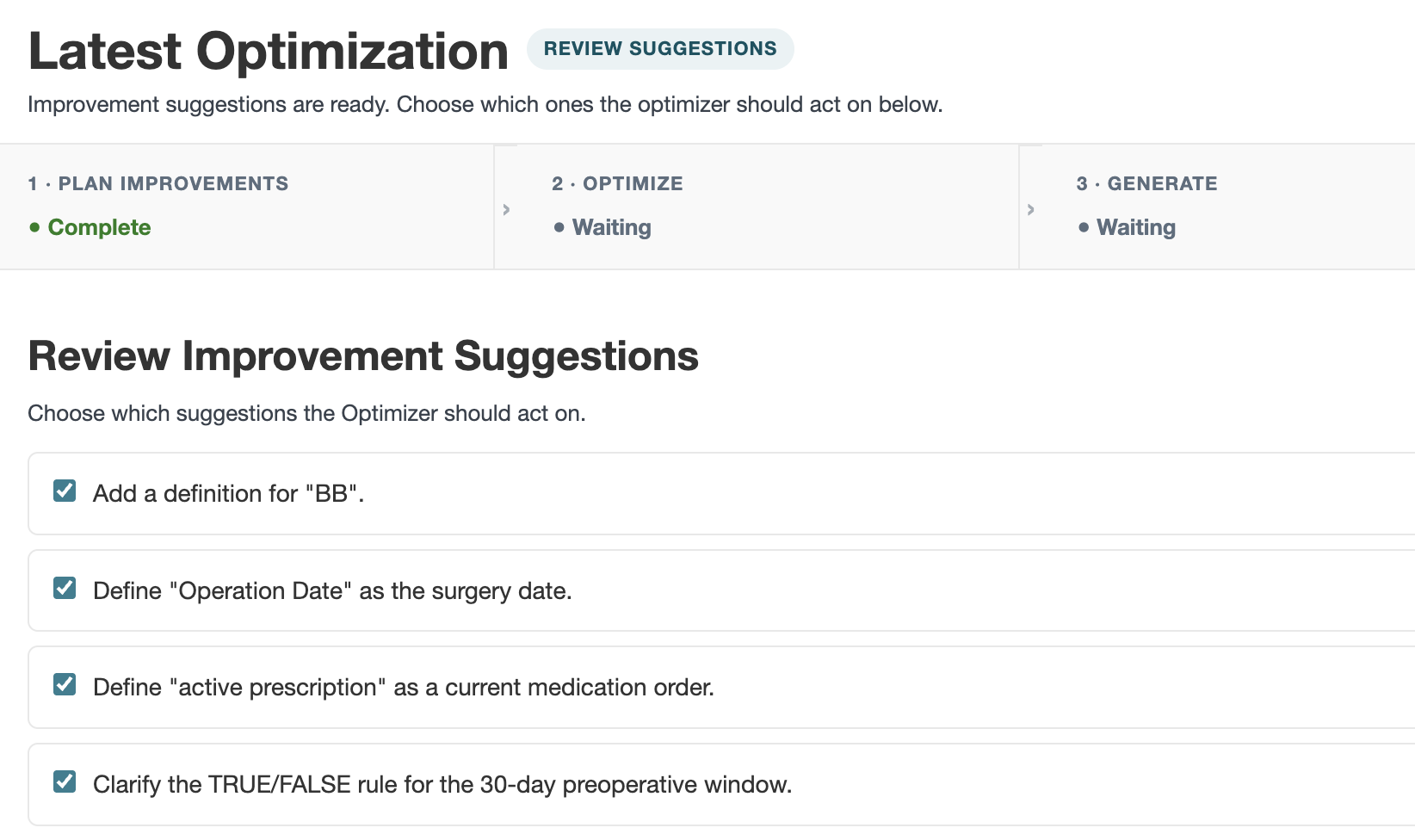
Learn more in our documentation.
Token Usage Management: Plan Your Spend
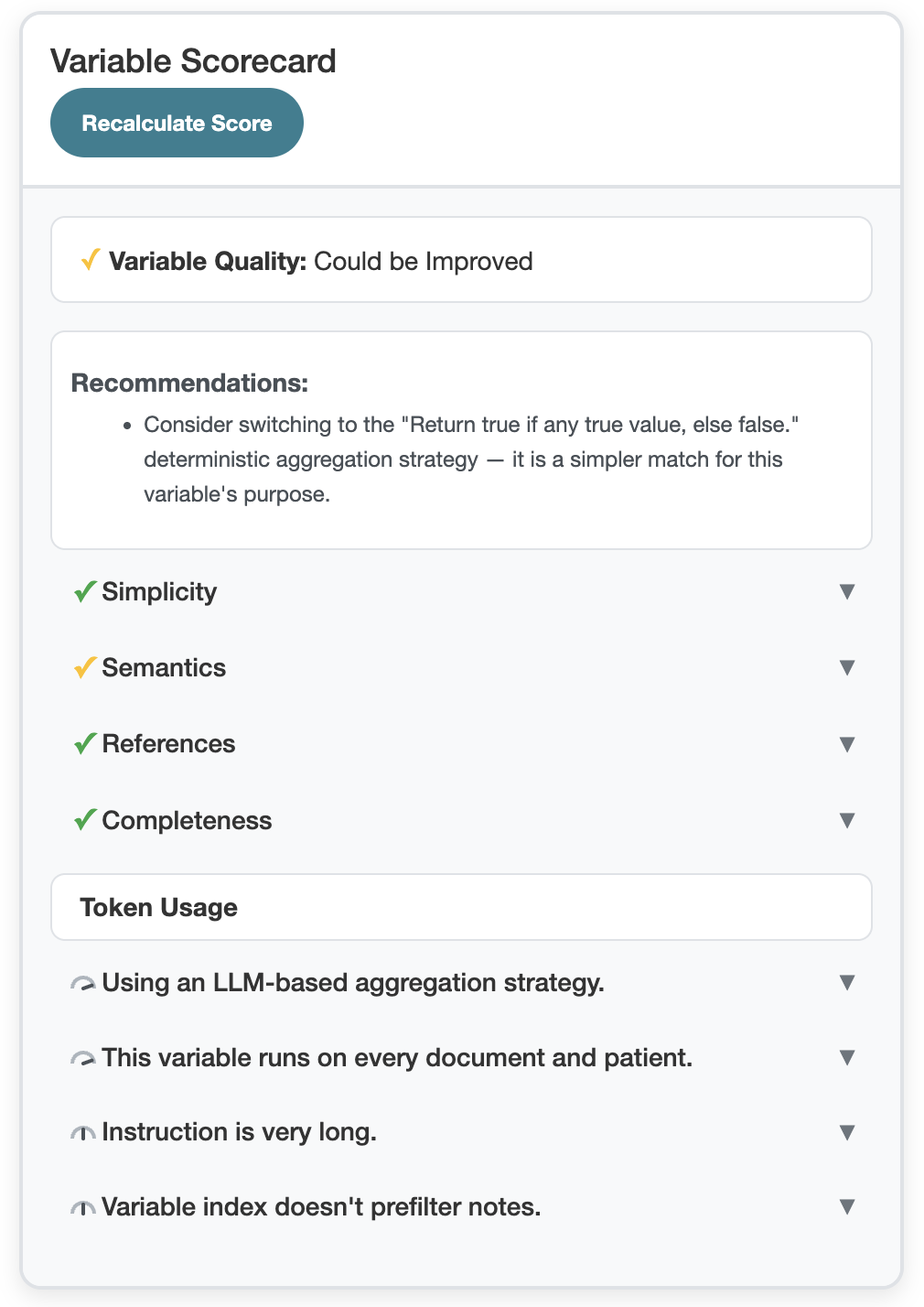
Accuracy and cost are linked. Every variable sends some portion of each note to the LLM, and those tokens add up quickly across a large patient cohort. These new tools help you see what your variables send, and make informed tradeoffs before you generate.
- Generation warnings. You'll see a warning when a label generation is expected to use a large number of tokens, and you'll be asked to confirm if it's projected to pass your project token limit.
- Token guidance in the Variable Scorecard. The Scorecard now gives feedback on each variable's token usage, with guidance on how to reduce it. Learn more.
- Variable Index Preview. Your Variable Index determines which portions of a note get sent to the LLM, so changing it can significantly affect token spend. Now you can preview how an index change would affect your variable before you commit to it. Learn more.
Better Results From Your Existing Variables
We've made several improvements to the main generation flow that should improve results on variables you already have:
- More consistent reasoning. Our automatic error check is updated so a label's reasoning is less likely to disagree with its value.
- More predictable timestamps. Timestamp logic is more predictable, and timestamp variables now have formatting options. Existing timestamp variables will be set to ISO format (YYYY-MM-DD), which you can change in Project Setup. Learn more.
- Retired aggregation strategies for One per Note variables. The "earliest date" and "latest date" aggregation strategies are retired for One per Note variables. Existing variables using them will be converted to custom aggregation.
Brim Improvements In This Release: Powered by You
There's nothing we love more at Brim than working with our customers on what would make their work smoother. This month's requested improvements include:
- Reviewer visibility. See who reviewed a label, and filter results by reviewer.
- API deletion. Delete a patient or a project via the API.
- Export improvements. Filter exports by multiple MRNs, and get raw text offsets and a link to patient results in the Detailed Export.
Keep them coming! If you have a request, reach out to support@brimanalytics.com or reply to one of our release emails.
Azure OpenAI GPT-4 Generation Retirements Postponed to April 2027
Azure AI Foundry is retiring OpenAI's generation 4 models, including gpt-4o, gpt-4o-mini, and the gpt-4.1 family. Microsoft has extended the retirement dates from October 2026 to April 2027.
If your project uses one of these models, we recommend switching to gpt-5.6-luna at minimal reasoning effort ahead of the retirement date so you have time to transition. Ask your Azure admin to deploy it, then update the model in your project settings. Questions? Reach out to support@brimanalytics.com.
Introducing Brim Field Notes: How VUMC Cut Chart Review Time for Surgery Rescheduling
We're launching Brim Field Notes, a live conversation series with the teams putting AI chart review into practice.
On Friday, October 23 at 12:00 PM CT, Beth Bass, Advanced Practice Manager at Vanderbilt University Medical Center, joins Brim CEO Dan Fabbri to share how her preoperative assessment team cut pediatric preop chart review from 320 nursing hours a month to 4. Expect a practical conversation about implementing AI for chart review, plus live Q&A, in about an hour.
How to Get the September Release
This release is available as:
Version 2026.09.30
You can check your current version in Settings → About.
As always, thank you for building with Brim. We're grateful to support the important work your teams are doing every day.