Brim October 2026 Release: Result Trace, Cost Transparency, and Brim MCP

November 2, 2026

This month is all about visibility. Result Trace shows you the steps behind a result, so you can understand why you're getting it. Cost Transparency lets admins set prices for the models in Brim so users can see spend in dollars, not only tokens. And if you've been using AI to create or edit variables, the Brim MCP Beta lets you connect a coding agent to your project for direct edits.
Result Trace: See Why You're Getting a Result
Ever look at a result and wonder how Brim got there? Result Trace opens up the steps behind each result, so you can follow the prompt and logic flow and not just the final value.
- See the LLM calls and logical steps behind a result. Open a result to view each step Brim took to produce it.
- Understand the why. Follow how Brim arrived at a value, not just the value itself.
- Fix variables with confidence. When a result isn't what you expected, Result Trace helps you pinpoint what to adjust in your variable instructions.

Learn more in our documentation.
Cost Transparency: See Spend in Dollars
Last month's Token Usage Management tools helped you plan your project's token budget. This month, you can see what your projects cost in dollars, too.
- Admins set model prices. Admins can set prices for each model in Brim to match what your organization pays.
- Users see costs in dollars. Once prices are set, admins can turn on Cost Transparency so users see costs in dollars alongside token counts. That makes it easier to plan and stay within your project budget.
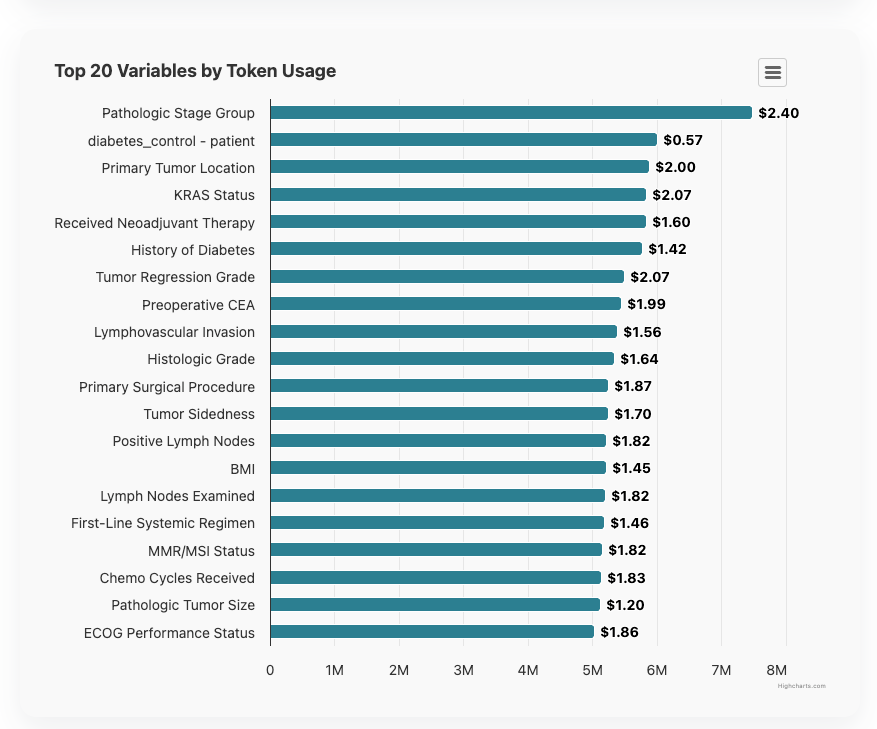
Learn how to set model prices and enable Cost Transparency.
Brim MCP Beta: Edit Variables from Claude Code or Codex
If you've been using AI to create or edit variables, Brim MCP lets you make those changes directly in Brim from Claude Code or Codex, with no copying and pasting between tools.
Brim MCP is in beta and requires some technical setup, including configuring an MCP connection in Claude Code or Codex.

More From Brim
- Best Models for Brim: OpenAI Generation 4-6. Our team compares OpenAI models for chart abstraction and recommends GPT-5.6-luna and GPT-6-luna as the best balance of cost, speed, and accuracy.
- Brim Field Notes Recap: How VUMC Cut Chart Review Time for Surgery Rescheduling. Missed our first Brim Field Notes conversation? Beth Bass, Advanced Practice Manager at Vanderbilt University Medical Center, joined Brim CEO Dan Fabbri to share how her preoperative assessment team reduced pediatric preop chart review time.
- Find us at AMIA. We'll be at Booth 130 and featured in sessions and posters. Come say hi!
How to Get the October Release
This release is available as:
Version 2026.10.31
You can check your current version in Settings → About.
As always, thank you for building with Brim. We're grateful to support the important work your teams are doing every day.