Brim February 2026 Release: Stronger Variable Creation, Optimization, and Validation

March 2, 2026
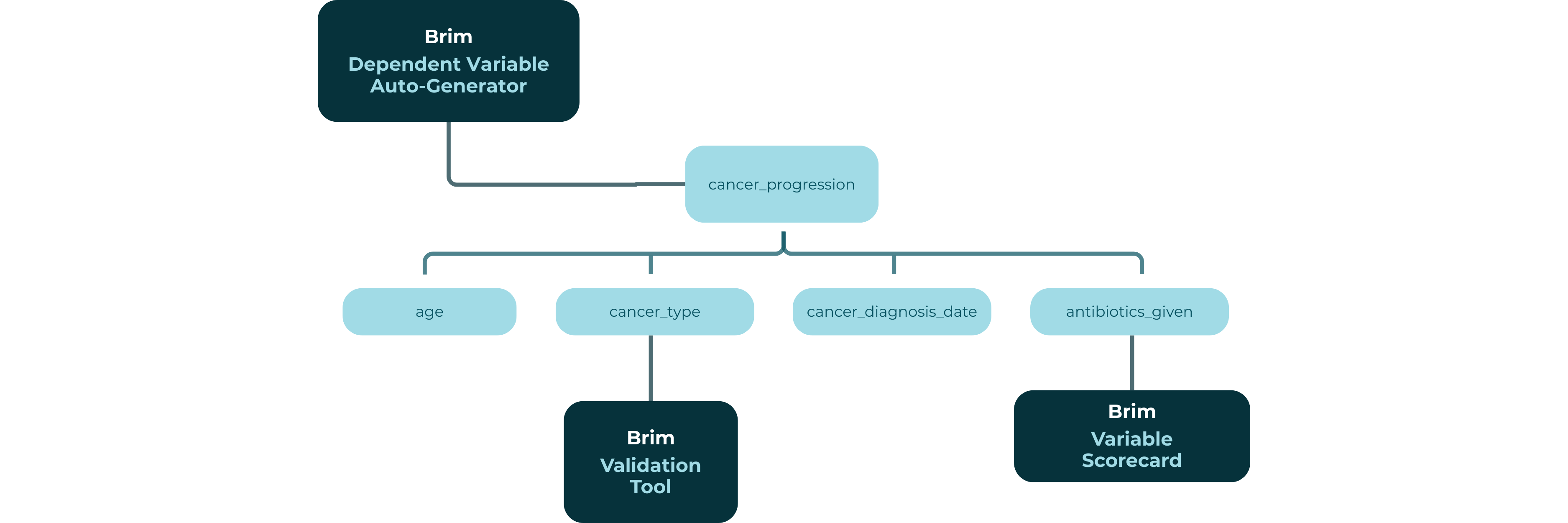
In order to get a great abstraction, you need a strong definition of what you want to abstract: or in the language of Brim, strong variables.
Every abstraction workflow, whether supporting clinical research, registries, or operational analytics, ultimately depends on how clearly variables are defined, how efficiently they’re created, and how confidently they’re validated.
This month’s Brim release focuses on strengthening that entire lifecycle.
The February 2026 release introduces major improvements across variable creation, optimization, and validation, helping teams move from project setup to trustworthy datasets with fewer iterations and less manual cleanup.
Building Better Variables from the Start
One of the most common challenges we see across abstraction projects is early setup friction.
Teams often begin with flat variable lists that later need restructuring as workflows mature. Parent-child relationships emerge over time, dependencies become clearer, and projects require repeated redesign before abstraction can scale.
The Dependent Variable Auto-Generator now addresses this directly.
Brim can now generate complete multi-level variable hierarchies, including all child variables automatically.
Instead of manually building abstraction structures piece by piece, teams can now:
- Generate structured variable trees from realistic clinical prompts
- Create parent variables and multiple levels of dependent children in a single step
- Begin projects with production-ready abstraction frameworks
This allows subject matter experts to translate real-world clinical reasoning directly into structured abstraction logic without weeks of upfront configuration.
Optimization That Reflects Variable Best Practices
Creating variables quickly is only useful if those variables are strong.
Historically, optimization happened later in the workflow: after generation, after review, and often after validation exposed inconsistencies.
With this release, variable auto-generation and optimization are now directly connected to the Brim Variable Scorecard.
Automatically generated variables are now optimized against Brim’s Core Variable Best Practices:
- Simplicity: clear and focused definitions
- Semantics: clinically meaningful interpretation
- References: appropriate relationships between variables
- Completeness: internally consistent definitions with examples
In practical terms, this means auto-generated variables arrive closer to validation-ready quality. Teams spend less time rewriting definitions and more time focused on outcomes.
Optimization starts with creation, and not as a separate cleanup phase.
Validation That Matches Real Clinical Data
Validation is where abstraction pipelines prove themselves.
But real-world clinical data rarely behaves in exact matches. Timestamps vary slightly. Measurements differ by rounding. Derived values may be equivalent even when not identical.
To better reflect real workflows, Brim now introduces configurable validation match rules.
For each variable, teams can define how agreement with a golden dataset should be evaluated:
- Exact Match: values must match precisely
- Match Rules: values can agree within ranges or calendar groupings
This enables validation workflows that align with clinical reality rather than rigid equality checks.
Faster Investigation When Values Don’t Match
Validation doesn’t end when disagreement appears; that’s where investigation begins.
This release also introduces new tools that make it easier to understand why values differ.
Within the Validation interface, users can now:
- Quickly review the variable definition directly from validation results
- View model reasoning and provide inline feedback
- Explore the full variable hierarchy contributing to a value
Instead of switching between multiple screens, teams can now move directly from discrepancy → investigation → refinement.
The result is a tighter feedback loop between theory and practice in abstraction workflows.
A Fully Updated Brim Startup Guide
Alongside product improvements, we’ve refreshed the Brim Startup Guide to reflect how successful teams actually deploy abstraction workflows today.
The updated guide walks through the full lifecycle of working in Brim:
- 101: Getting Started
- 201: Iteration, Optimization & Validation
- 301: Real Workflows
- 401: Advanced Toolkit
Whether you’re launching your first project or scaling across departments, the guide now provides clearer pathways from setup to production abstraction.
And for those feeling confident: we’ve added a new Startup Guide Quiz to test your expertise.
How to Get the February Release
This release is available as:
Version 2026.02.26
You can check your current version in Settings → About.
As always, thank you for building with Brim.
We’re excited to keep making abstraction faster, clearer, and more trustworthy — and grateful to support the work your teams are doing every day.